In a fast-growing startup, our focus was on core features, but this left a critical user touchpoint the order page, underdeveloped. Our data and user feedback highlighted significant issues. The existing design was fragmented, making it difficult for users to quickly find key information like tracking details, order status, and customer support options. This led to user frustration, a high volume of repetitive support inquiries, and missed opportunities to re-engage customers after a purchase.
Based on our findings, we set clear, measurable goals for the redesign:
Enhance Discoverability: Consolidate and organize key information to reduce user confusion and the need for support.
Improve Clarity: Establish a clear visual hierarchy that helps users scan and understand their order details at a glance.
Encourage Engagement: Streamline the user journey to present clear, actionable next steps, such as reordering or viewing related items.
Build for Scalability: Create a modular design system that could be easily adapted and used for future features and product updates.
As the product designer, I was responsible for the end-to-end design process, from initial research and ideation to prototyping, user testing, and final handoff. My approach was to work closely with the engineering and marketing teams to ensure we balanced ideal user experience with technical constraints and business objectives.
Research & Discovery
With the fast pace of a startup, I conducted a mix of lean research methods. I analyzed existing product analytics to identify common drop-off points and user flows on the current page. I then conducted informal interviews with a handful of our power users to understand their pain points and expectations. The key insights were consistent: users wanted to know their order status instantly and have a clear, direct path to getting help or taking a next action.
Ideation & Iteration
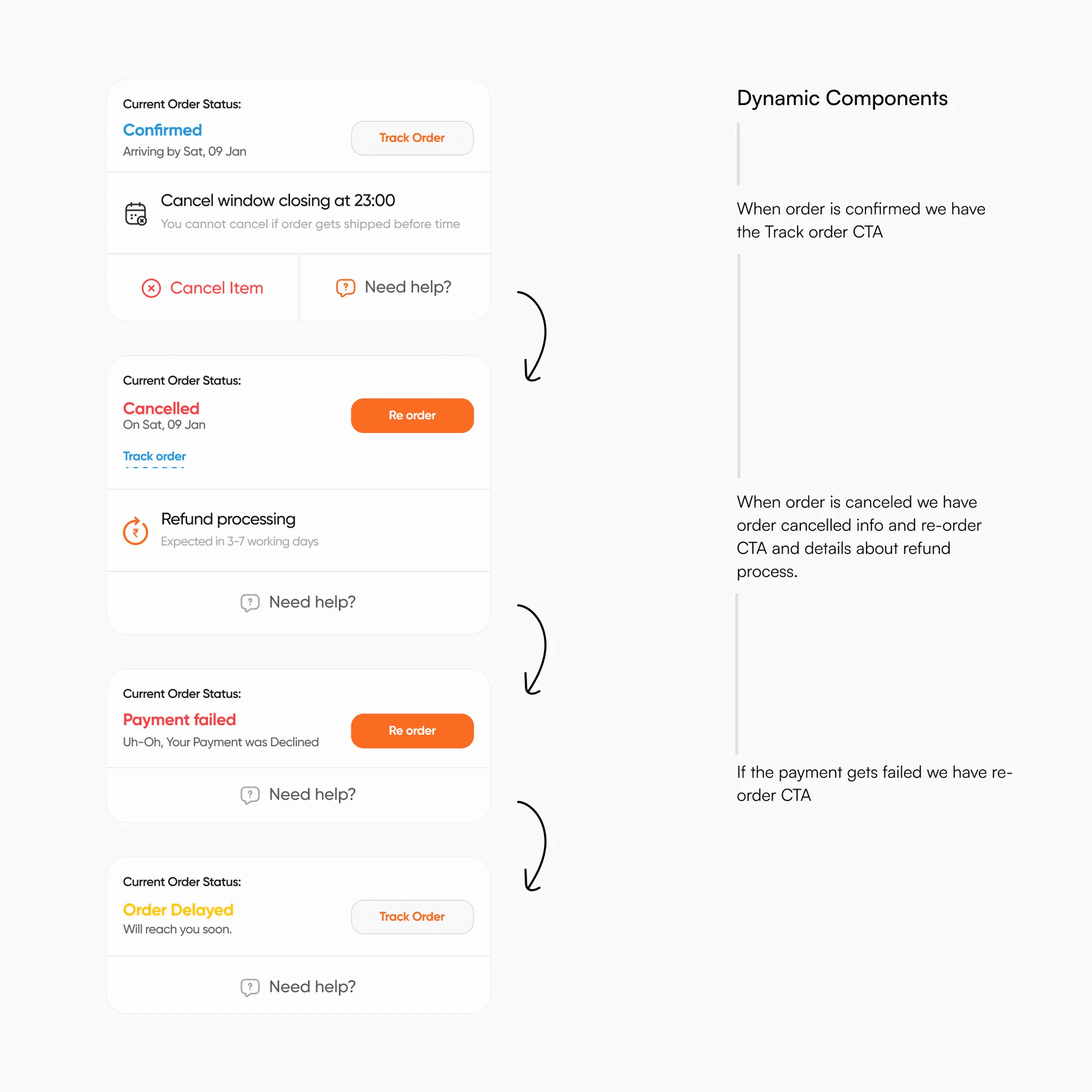
Using these insights, I began with low-fidelity wireframes and sketches to explore various layouts. I focused on building a clear, information-first hierarchy. As the designs progressed to higher fidelity, I created interactive prototypes to test with users. This iterative feedback loop was crucial in refining the layout. A core part of this phase was also designing the page using dynamic components to create a scalable, modular system that the team could reuse for future features, saving valuable development time.
The final design brought a clean, intuitive, and highly functional order page to life. We focused on reducing visual clutter and bringing the most critical information to the forefront.
Before & After: Key Improvements

Design Decisions
Every change was made with a purpose. Here are a few key design decisions that drove the improved experience:
Simplified Status Tracker: We replaced the fragmented, text-heavy status updates with a clear, vertically-aligned tracker. This simplified the visual flow and allowed users to instantly see their order’s progress.
Consolidated Information: Instead of scattering information across the page, we used a single, card-like component to house all order-specific details, including item specifics, delivery dates, and the total cost. This created a cohesive and easy-to-scan block.
Clear Next Steps: Crucially, we added a clear section for post-purchase actions. Users now have prominent, actionable buttons to "Reorder" or "Get Support," which not only reduced friction but also led to increased re-engagement.
The redesign was a resounding success, delivering tangible improvements for both our users and the business.
Quantifiable Results:
Reduced Support Tickets: The clarity of the new page led to reduction in support tickets related to order status inquiries.
Increased Post-Purchase Engagement: The prominent call-to-action buttons resulted in increase in reorders and improvement in click-throughs to related products.
Qualitative Feedback:
User feedback confirmed the positive change. One user said, "It's so much cleaner now. I can just glance at it and know exactly where my order is. It’s perfect."
This project reinforced the power of a lean design process in a startup environment. I learned that you don't need extensive resources to make a significant impact; you just need to deeply understand the user's problem and make intentional design decisions. The ability to build scalable components not only delivered a better user experience but also became a core asset for our development team, accelerating our future product roadmap. This project was a great example of how a few thoughtful design decisions can have a profound effect on both user satisfaction and business metrics.
Designed & developed by Hemanshu Patel